





The right access
for the right person
Create roles with fine grained permissions across every module. Override per user, manage teams, with a filterable audit log.
From open access to governed permissions in 4 steps
Define the roles you need, assign them to people and teams, override per user, with every change in an audit log.
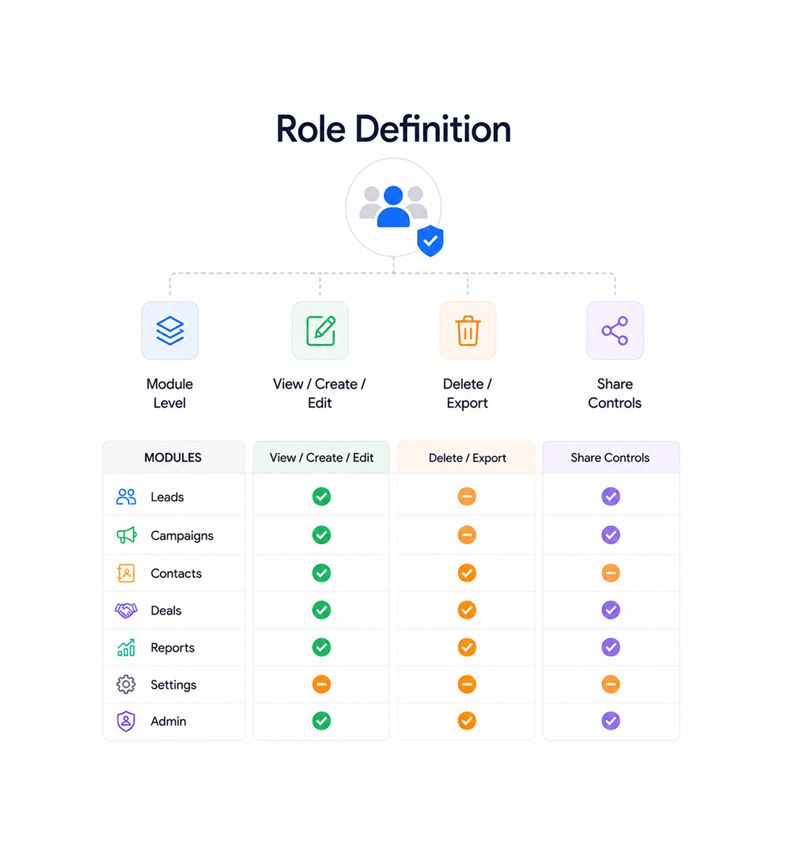
Role Definition
Define roles with fine grained permissions
Build the roles your business needs: Sales Rep, Sales Manager, Marketer, Operations Analyst, Read Only. Each role carries permissions for every module at the action level: view, create, edit, delete, export, share.
- Module Level
- View / Create / Edit
- Delete / Export
- Share Controls
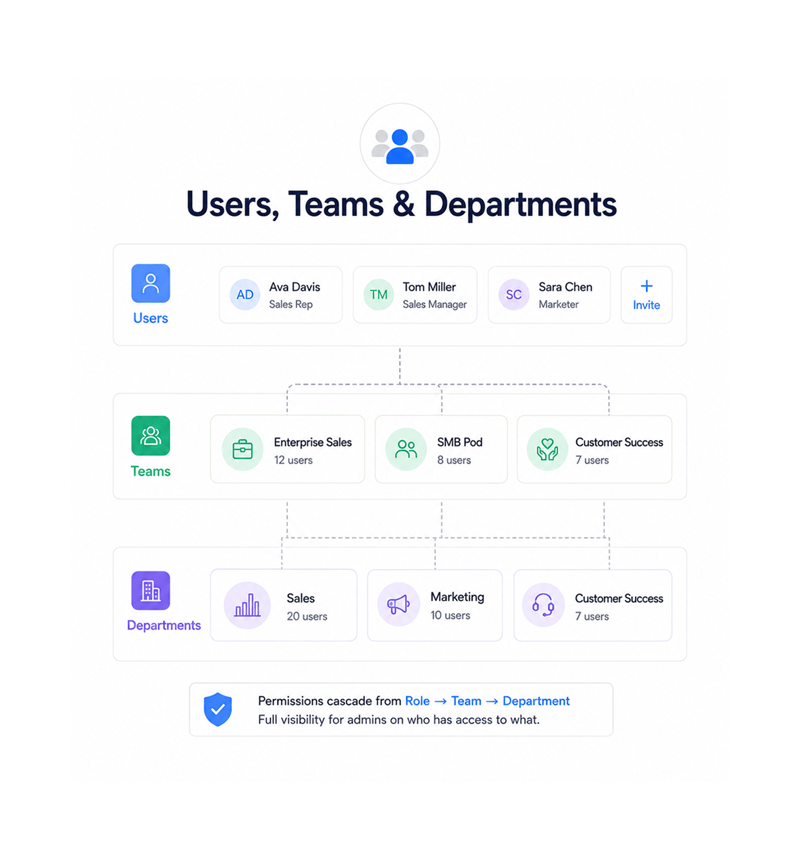
Users, Teams & Departments
Assign access the way your organisation actually works
Invite users and assign one or more roles. Group them into teams for daily collaboration, then roll teams into departments for the broader org. Permissions cascade cleanly from role to team to department.
- Users
- Teams
- Departments
- Cascading Permissions
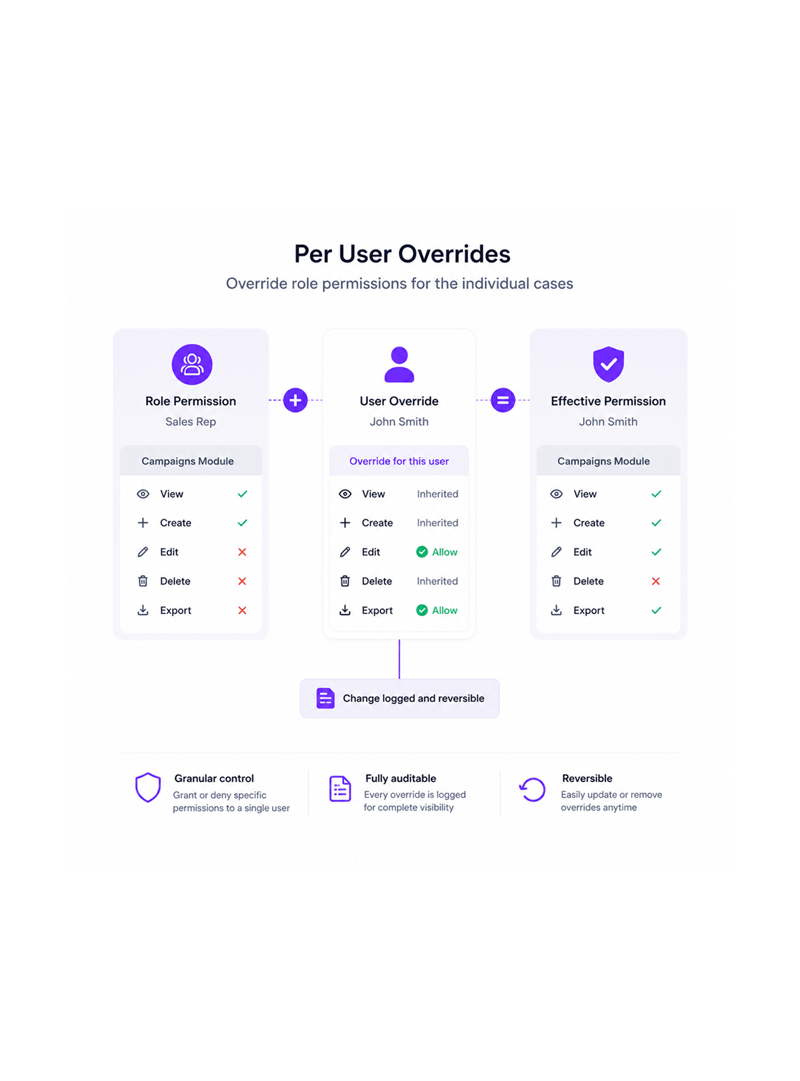
Per User Overrides
Override role permissions for the individual cases
Every organisation has them: the rep needing read access outside their role, the manager filling in for a head, the contractor needing export rights. Per user overrides handle these as logged, reversible actions.
- Grant Override
- Deny Override
- Time Bound
- Reversible
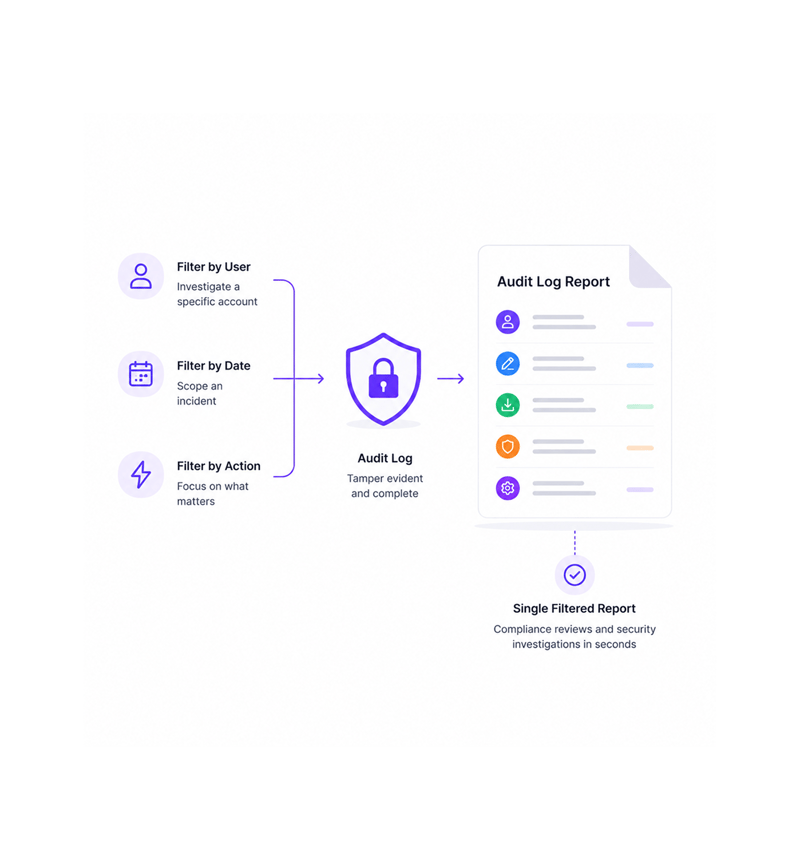
Audit Log Reports
Filter the audit log by user, date, and action type
Every action that touches the platform, every login, edit, permission change, export, and admin operation, lands in a tamper evident audit log. Filter by user, date range, or action type for one report.
- By User
- By Date Range
- By Action Type
- Export Ready
Six reasons teams never go back
Once an organisation runs on defined roles, per user overrides, and a real audit log, the old Admin / Manager model looks like an open door.

Sales reps see their leads, not everyone else's
The classic CRM mistake, giving every rep access to every record, disappears once roles are defined. Reps work their own book, managers see their team's.

New hires get set up in seconds, not days
Onboarding becomes one click. Invite the new hire, assign the Sales Rep role and EMEA team, and they land with exactly the access their role allows.

Exceptions stop becoming policy
Every team has special cases: the analyst needing export rights, the manager covering a head. Per user overrides handle them, logged and auto expiring.

Department managers run their own teams without IT in the loop
The Sales Manager adds a rep, the CS lead adjusts a squad, the Marketing director grants read access, all within their department, with guardrails.

Auditors finish in an afternoon, not a fortnight
The audit log answers what auditors ask. Who exported data in ninety days? Who logged in during the incident? Three clicks and a CSV, not a two week project.

Compliance reviews stop being a fire drill
The data for SOC 2, ISO 27001, and GDPR access reviews is already collected, filterable, and exportable. The quarterly review becomes a Monday report.
Sales reps see their leads, not everyone else's
The classic CRM mistake, giving every rep access to every record, disappears once roles are defined. Reps work their own book, managers see their team's.
New hires get set up in seconds, not days
Onboarding becomes one click. Invite the new hire, assign the Sales Rep role and EMEA team, and they land with exactly the access their role allows.
Exceptions stop becoming policy
Every team has special cases: the analyst needing export rights, the manager covering a head. Per user overrides handle them, logged and auto expiring.
Department managers run their own teams without IT in the loop
The Sales Manager adds a rep, the CS lead adjusts a squad, the Marketing director grants read access, all within their department, with guardrails.
Auditors finish in an afternoon, not a fortnight
The audit log answers what auditors ask. Who exported data in ninety days? Who logged in during the incident? Three clicks and a CSV, not a two week project.
Compliance reviews stop being a fire drill
The data for SOC 2, ISO 27001, and GDPR access reviews is already collected, filterable, and exportable. The quarterly review becomes a Monday report.




2700+
Organisations governing access
properly
Built for organisations that take permissions seriously
IT admins, security teams, compliance officers, department heads, and people ops use EVOX as the access control layer. The role library is the policy, per user overrides are the exceptions, the audit log is the receipt.
Fine Grained
Overrides
Audit Trail
Admin Bypass
Granular by default
Every module, leads, campaigns, contacts, deals, reports, exposes permissions at the action level: view, create, edit, delete, export, share. Roles compose these into your access policies, with cascading inheritance.
Everything access governance ships with
A complete user and role toolkit inside your email platform. Fine grained roles, per user overrides, and an audit log.

Fine Grained Role Permissions
Build roles with permissions defined at the module and action level: view, create, edit, delete, export, share. The role library is your access policy.

Per User Permission Overrides
Grant or deny permissions to one user on top of their role. Exceptions become a logged, reversible, optionally time bound action.

Team & Department Management
Group users into teams for daily work and roll teams into departments. Permissions cascade through the hierarchy, and managers run their own teams.

Super Admin Bypass
A Super Admin role exists for the moments that need it: incident response, emergency overrides, debugging. Its actions are logged with extra detail.

Filterable Audit Log Reports
Every action lands in a tamper evident audit log. Filter by user to investigate an account, by date range to scope an incident. Export to PDF or Excel.

Module Level Access Control
Every module, leads, campaigns, contacts, deals, reports, settings, exposes its own permissions. Sales sees leads but not billing. Read Only just browses.
Everything you need to know
Common questions about how EVOX handles roles, permissions, teams, and the audit log.
Evox sends campaigns that feel one-to-one at scale.
Behavior-triggered emails that build, personalize, and send themselves so every subscriber gets the right message at the right moment.
- 4.1x
- average campaign ROI
- 68%
- open rate improvement
- 3.2x
- conversion rate lift
- 0
- spam complaints