





Build and share custom
views across your team
Each rep gets one customer view filtered their way. Set filters by score, stage, owner, or intent and share in a click.
From complex filters to saved team views in 4 steps
Build views with multiple filters, pick a layout, save for reuse, and share with your team instantly.
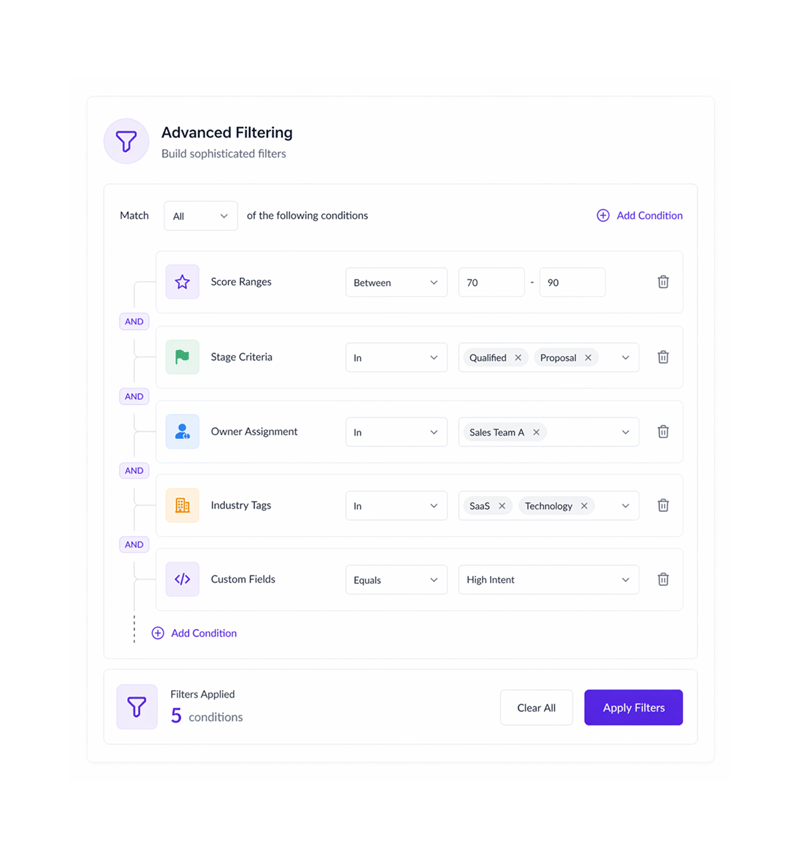
Advanced Filtering
Build sophisticated filters
Create complex filters combining score ranges, stage criteria, ownership, industry classifications, intent signals, custom fields, and date ranges. Stack multiple conditions with AND/OR logic.
- Score Ranges
- Stage Criteria
- Owner Assignment
- Industry Tags
- Custom Fields
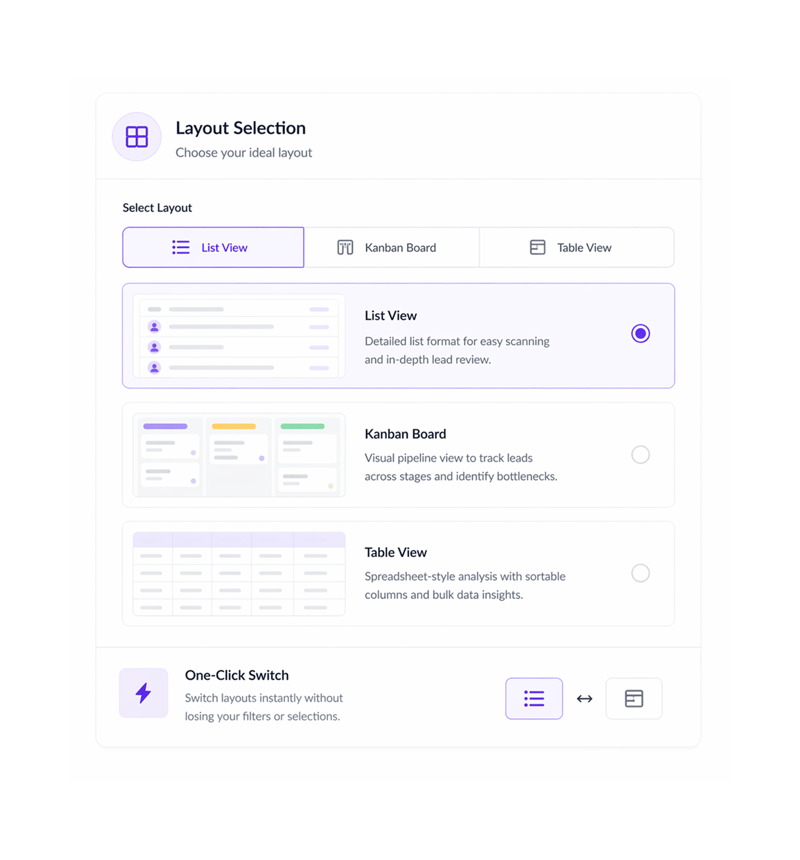
Layout Selection
Choose your ideal layout
Switch between list view for detailed scanning, kanban boards for pipeline visualization, or table view for spreadsheet style analysis. Each layout optimized for different workflows.
- List View
- Kanban Board
- Table View
- One Click Switch
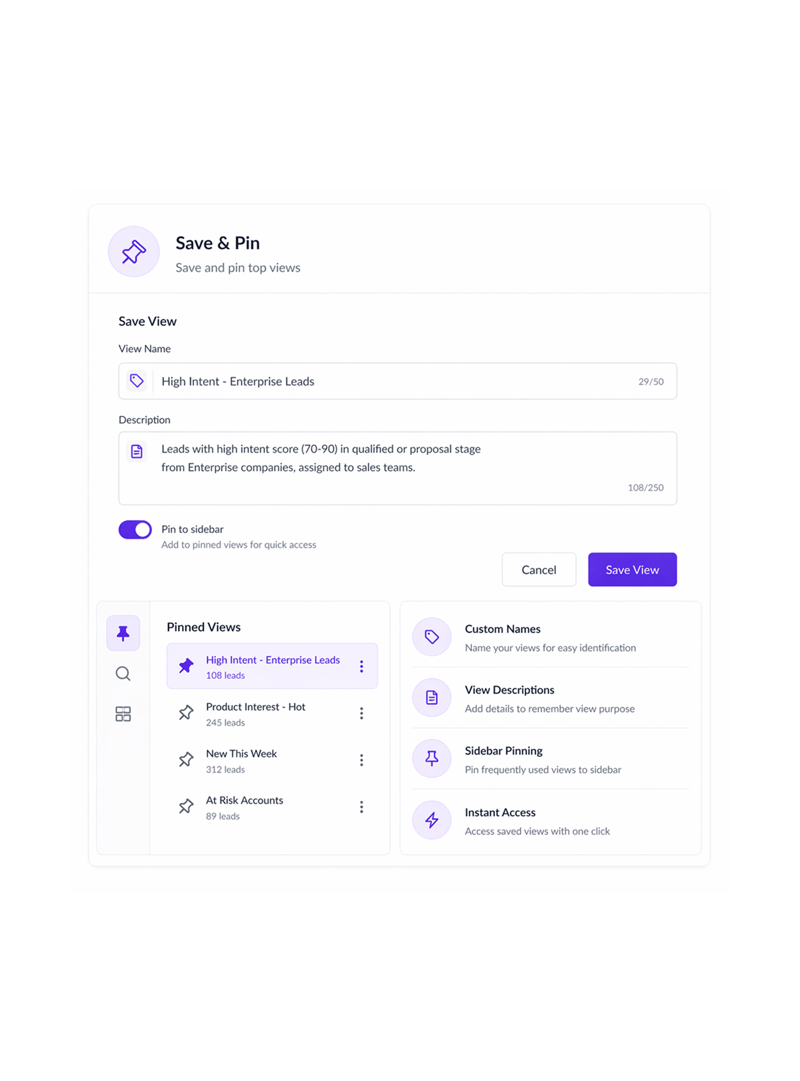
Save & Pin
Save and pin top views
Save your filtered views with custom names and descriptions. Pin your most used queries to the sidebar for instant access. Create unlimited saved views for different scenarios.
- Custom Names
- View Descriptions
- Sidebar Pinning
- Instant Access
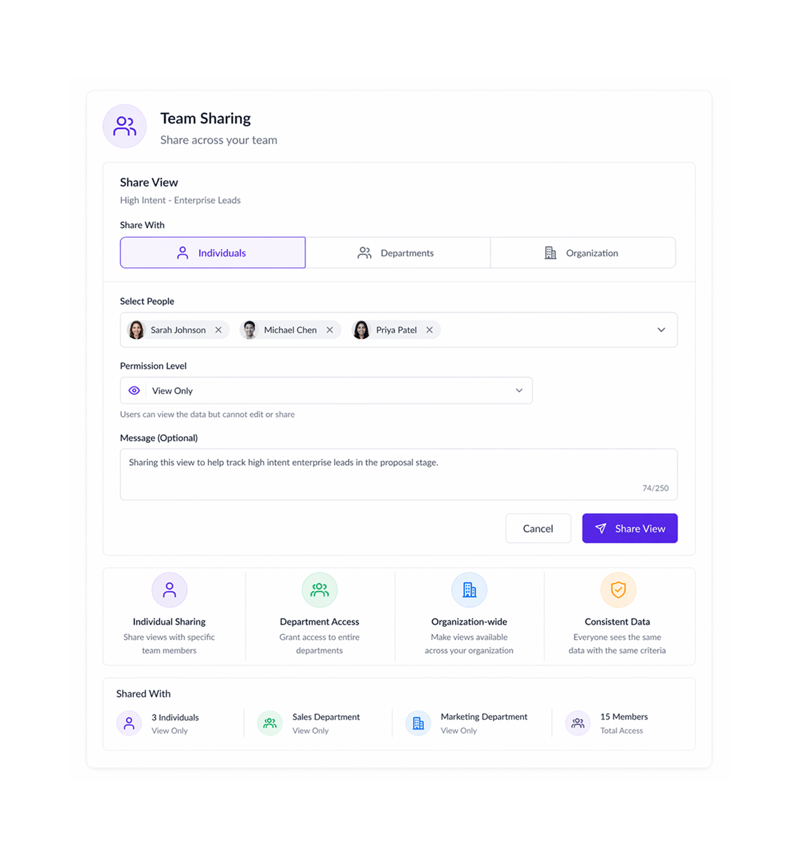
Team Sharing
Share across your team
Share saved views with specific team members, departments, or the entire organization. Collaborative views ensure everyone sees the same data with consistent criteria.
- Individual Sharing
- Department Access
- Organization wide
- Consistent Data
Six reasons teams never go back
Once teams have a CRM with 360 degree customer view, going back to a fixed layout feels limiting

Saved Filter Combinations
Save filters, visible columns, and sort order as named views. Reusable combinations cut repetitive setup and keep lead management efficient.

Custom Field Filtering
Filter by any custom field via JSONB storage for flexible, targeted views. Custom field filtering gives personalized, systematic access.

AI Scoring Integration
Filter leads by AI scoring including Lead Score, ICP Fit, and Intent Score for smart prioritization. Data-driven filtering keeps it systematic.

Three Visibility Levels
Set view visibility to Private, Team, or Public for org-wide access. Levels give clean access control and shared efficiency.

Multi Module Support
Create custom views for Leads, Contacts, and Deals with consistent filtering. Multi-module support keeps data and workflows consistent.

Column Organization Control
Configure visible columns and display order to optimize what appears on screen. Column control gives personalized views and faster workflows.
Saved Filter Combinations
Save filters, visible columns, and sort order as named views. Reusable combinations cut repetitive setup and keep lead management efficient.
Custom Field Filtering
Filter by any custom field via JSONB storage for flexible, targeted views. Custom field filtering gives personalized, systematic access.
AI Scoring Integration
Filter leads by AI scoring including Lead Score, ICP Fit, and Intent Score for smart prioritization. Data-driven filtering keeps it systematic.
Three Visibility Levels
Set view visibility to Private, Team, or Public for org-wide access. Levels give clean access control and shared efficiency.
Multi Module Support
Create custom views for Leads, Contacts, and Deals with consistent filtering. Multi-module support keeps data and workflows consistent.
Column Organization Control
Configure visible columns and display order to optimize what appears on screen. Column control gives personalized views and faster workflows.




750+
visualization teams
Built for every team that needs custom perspectives
Sales managers, ops teams, and analysts rely on LIO custom views for a 360-degree pipeline view. The filter shapes what you see; the layout shapes how. Everyone customizes, so everyone uses it.
filter criteria
filter operators
layout options
team shareable
Custom views drive team alignment
Sales managers create and share views filtered by territory, stage, score, and owner. Saved views end filter confusion so reps never rebuild queries, keeping the team on the same data.
Built for systematic data organization
Everything for advanced custom views: JSONB fields, multi-module support, team sharing, and saved views.

JSONB Custom Field Support
Filter by any custom field via JSONB for flexible, unlimited filtering. JSONB gives personalized, systematic access.

Multi Module Compatibility
Create custom views for Leads, Contacts, and Deals with consistent filtering. Multi-module support keeps the sales stack organized.

Team Collaboration Views
Share views with Private, Team, or Public visibility for aligned access. Clean controls keep collaboration coordinated.

AI Scoring Integration
Filter leads by AI scoring including Lead Score, ICP Fit, and Intent Score for smart prioritization. Data-driven and systematic.

Custom Lookup Filtering
Filter by Status, Priority, Source, Tags, and Industry via custom lookups. Categorization stays consistent.

Multi Language View Support
Access custom views in English and Hindi with browser auto-detection for global teams. Views stay accessible and coordinated.
Everything you need to know
Get answers to common questions about LIO's Custom Views and Filters feature.
Lio captures, scores, and follows up on every lead the moment it lands.
Win on speed with AI that routes and qualifies leads in real time, so your team always works the deals most likely to close.
- 3.2x
- faster lead response
- 94%
- lead capture rate
- 0
- leads missed
- 40%
- higher close rate