





Drag, drop, ship. Your quarter
is on the calendar.
Drag Ranko's clusters straight onto a ninety day calendar. Each card carries its pillar, supports, article type, and links.

From cluster to scheduled calendar in 4 steps
Every approved cluster is a hand off ready card. Drag it into a week, then send it to writers or Content Forge in one click.

Enriched Cards
Approved clusters appear as cards
Every approved cluster shows up in the library as a card carrying the pillar topic, supporting terms, suggested article type, Opportunity Score, internal links, and rationale. Ready cards waiting to be slotted in.
- Pre-Enriched Cards
- Pillar & Supports
- Opportunity Score
- Ready to Slot
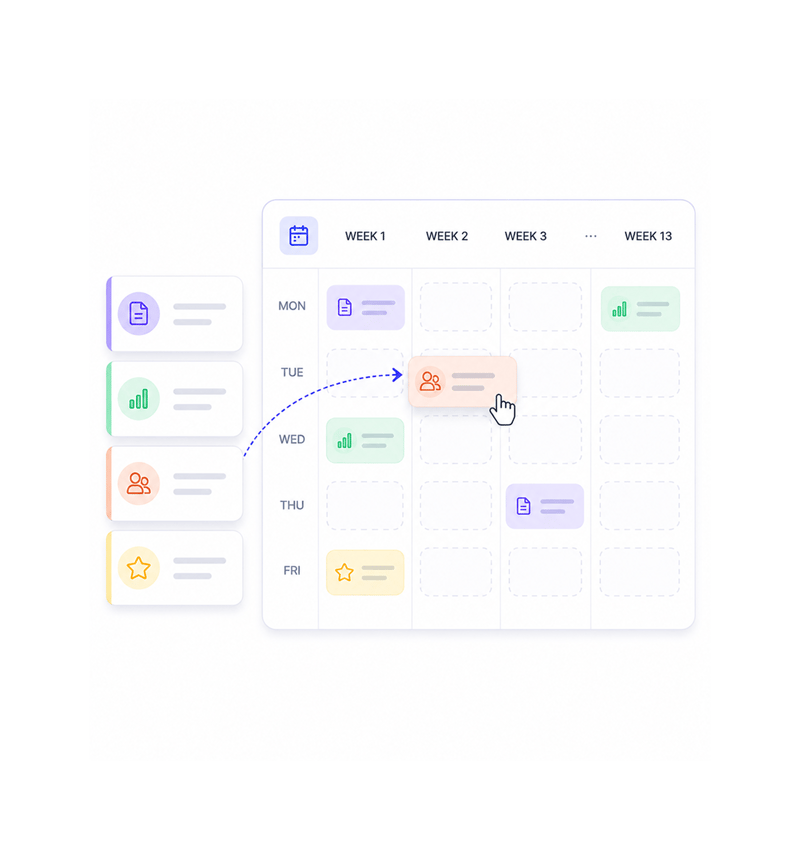
Drag and Drop
Drag cards into the weeks you want
The calendar shows thirteen weeks at a glance with a slot for every publishing day you configure. Pick up a card, drop it into the week you want, and it updates instantly. Work that needed hours takes minutes.
- 13 Week View
- Drag and Drop
- Instant Reorder
- No Meeting Needed
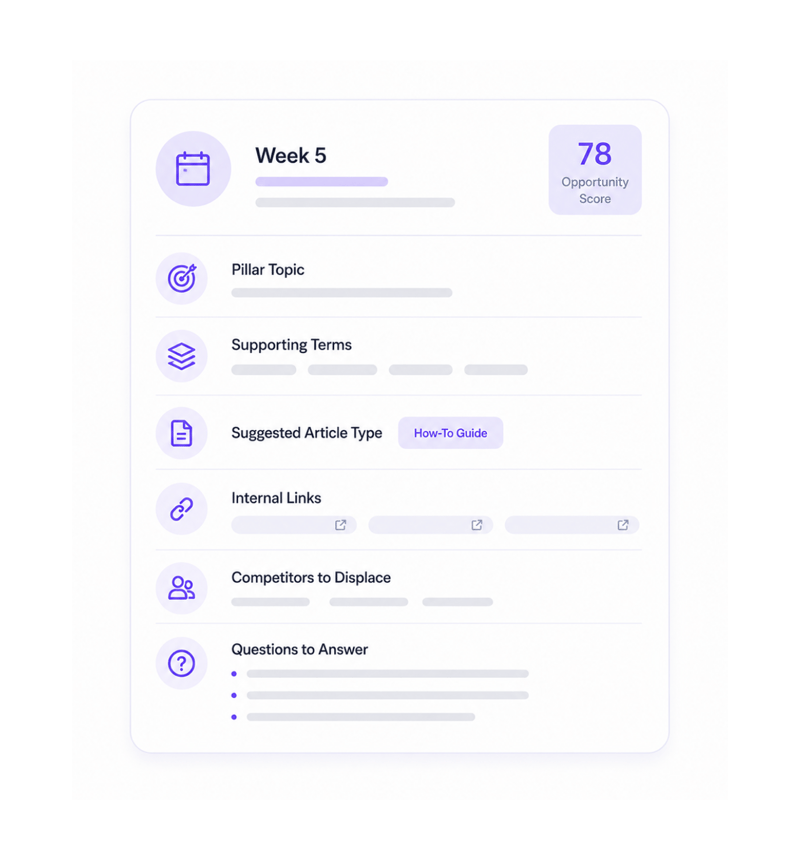
Cards Are Briefs
Each card is a hand off ready brief
Open any card and the full brief is there. The pillar topic. The supporting terms. The article type. The internal links. The Opportunity Score, the competitors, the questions to answer. Ready to hand over.
- Full Brief on Card
- Article Type Suggested
- Internal Links Attached
- Zero Brief Writing

One Click Hand Off
Send to your team or Content Forge
Once approved, the hand off is one click. Send the card to Content Forge to draft in your brand voice. Send it to Notion, Google Docs, Asana, ClickUp, or Slack with the full brief attached.
- To Content Forge
- To Your Team
- Notion · Docs · Asana
- Live Hand Off
Six reasons the calendar stops being a wish list
Once a team drags approved clusters onto a ninety day calendar, each card carrying its full brief, spreadsheets stop.

The calendar replaces the spreadsheet
Most content calendars go stale a week after they are built. The 90-Day Calendar is live: every card stays linked to its cluster, scores update.

Every card arrives already enriched
The pillar topic, supporting terms, article type, links, and Opportunity Score are on the card before anyone drags it. The brief is already written.

Reordering is a drag, not a rebuild
When priorities change, a launch shifts, a competitor moves, the calendar reshuffles in seconds. Pick up the cards that move and the rest adjusts.

Internal linking targets are pre-attached
Internal linking is one of the highest leverage moves in content and the most neglected. Each card already includes suggested links to use.

Hand off is one click
The calendar is a hand off surface, not a destination. Send the card to Content Forge to draft, or the brief to writers in their platform. One click.

The team finally publishes on schedule
The shift from we publish when ready to we publish what is on the calendar changes a team's rhythm. The compounding that needs cadence starts.
The calendar replaces the spreadsheet
Most content calendars go stale a week after they are built. The 90-Day Calendar is live: every card stays linked to its cluster, scores update.
Every card arrives already enriched
The pillar topic, supporting terms, article type, links, and Opportunity Score are on the card before anyone drags it. The brief is already written.
Reordering is a drag, not a rebuild
When priorities change, a launch shifts, a competitor moves, the calendar reshuffles in seconds. Pick up the cards that move and the rest adjusts.
Internal linking targets are pre-attached
Internal linking is one of the highest leverage moves in content and the most neglected. Each card already includes suggested links to use.
Hand off is one click
The calendar is a hand off surface, not a destination. Send the card to Content Forge to draft, or the brief to writers in their platform. One click.
The team finally publishes on schedule
The shift from we publish when ready to we publish what is on the calendar changes a team's rhythm. The compounding that needs cadence starts.




9600+
Teams shipping content from a calendar instead of a wish list
Built for teams who want their calendar to mean something
Founders holding a steady cadence, content leads building calendars they can defend, agencies running many clients, and growth teams all use the 90-Day Calendar to turn strategy into a schedule.
& Drop
View
Cards
Hand Off
Drag, drop, reorder, schedule
A live ninety day calendar showing thirteen weeks at a glance, with a slot for every publishing day. Drag approved cards into the weeks you want, reorder when priorities shift.
Everything the calendar surface ships with
A complete content ops toolkit in one platform. Drag and drop cards, enriched briefs, one click hand off.

Drag and Drop Cluster Cards
Approved clusters appear as cards. Drop one onto the week you want and it slots in. Reorder or swap, every move updates instantly.

90 Day Publishing Calendar
A live thirteen week view of the next quarter, with a slot for every publishing day. It updates as you move cards and scores shift.

Pre-Enriched Brief Cards
Every card already carries the full brief: pillar topic, supporting terms, the Opportunity Score, and the questions to answer.

Suggested Internal Linking Targets
Each card includes suggested internal links to your existing pages: pillar pages to link back to and supports to link sideways.

Article Type Recommendations
Each card includes the suggested article type, comparison, how to, listicle, or hub, based on the pillar and questions. No guessing.

One Click Hand Off
Send the card to Content Forge to draft in your brand voice. Send the brief to writers in Notion, Docs, Asana, or Slack. One click.
Everything you need to know
Questions about what is on a card, article types, internal links, and hand off.
Ranko writes content that ranks and gets cited.
Publish AI-written, search-optimized articles that win on Google today and get cited by AI engines tomorrow.
- 10x
- faster content production
- 3.4x
- more organic traffic
- 0
- ranking opportunities missed
- 87%
- of articles rank in 90 days