





Reusable templates.
Controlled changes.
Reusable templates with categories, custom fields, and use counts. An edit request workflow keeps changes versioned.
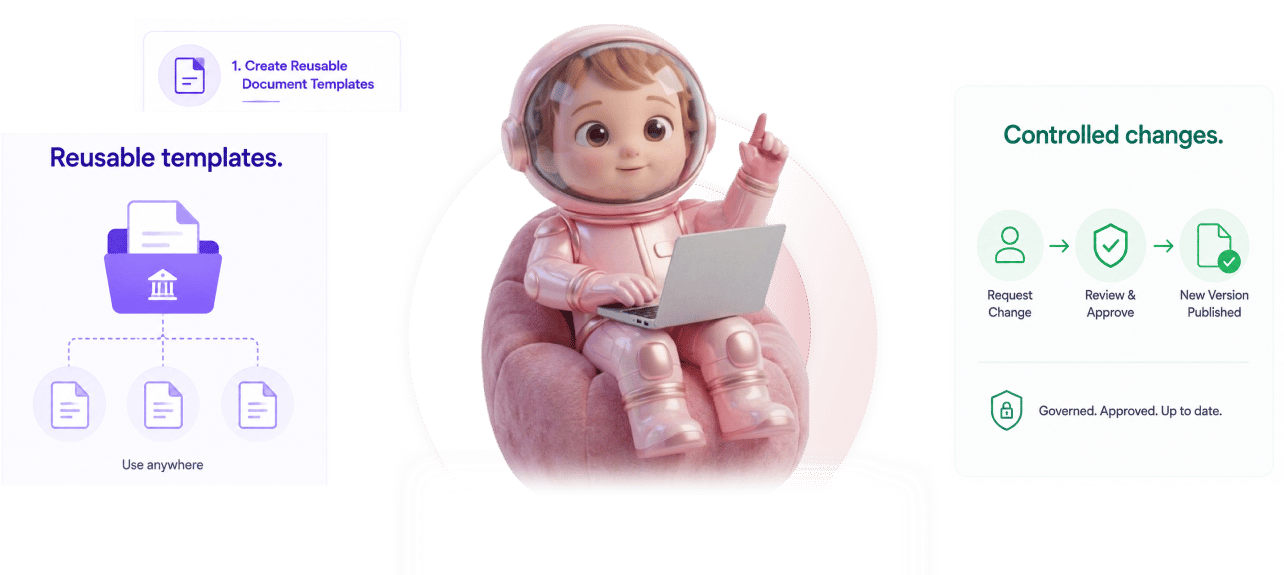
From template creation to controlled changes in 4 steps
Create reusable templates with categories, add custom fields, share globally, manage changes via edit requests.
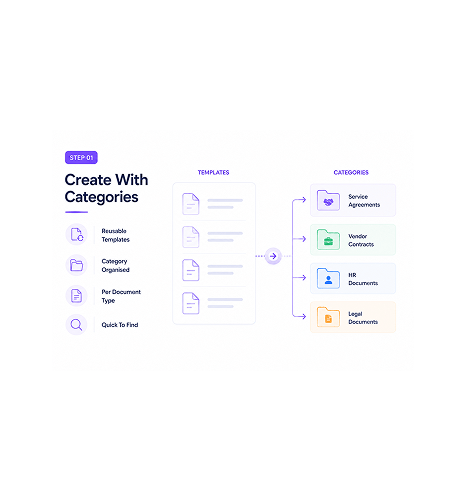
Create With Categories
Create reusable templates with categories
Any document the team uses repeatedly can become a template. NDAs, service agreements, vendor onboarding, employment offers. Categories organise templates by type so the team finds the right one quickly.
- Reusable Templates
- Category Organised
- Per Document Type
- Quick To Find
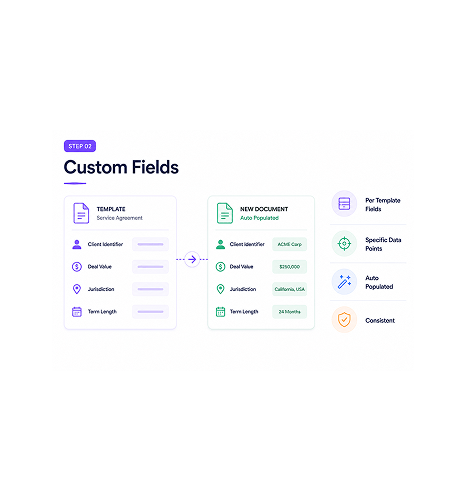
Custom Fields
Add custom fields the team needs
Each template can carry custom fields specific to that type. Client identifier, deal value, jurisdiction, contract term. The fields populate automatically on new instances, so the team's data points stay consistent.
- Per Template Fields
- Specific Data Points
- Auto Populated
- Consistent
- AI score applied
- Live table update
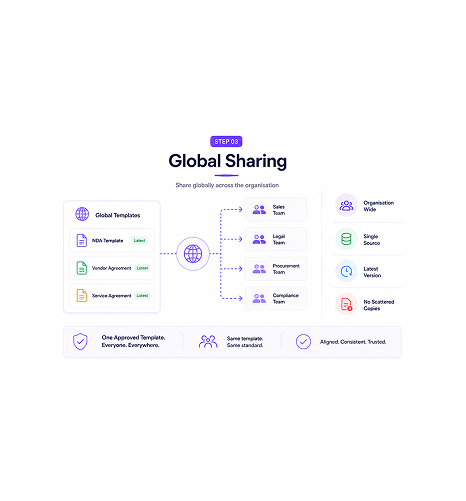
Global Sharing
Share globally across the organisation
Templates published globally are available to everyone. Sales operations uses the same NDA template legal maintains; procurement uses the same vendor agreement compliance approved. Everyone works from approved versions.
- Organisation Wide
- Single Source
- Latest Version
- No Scattered Copies
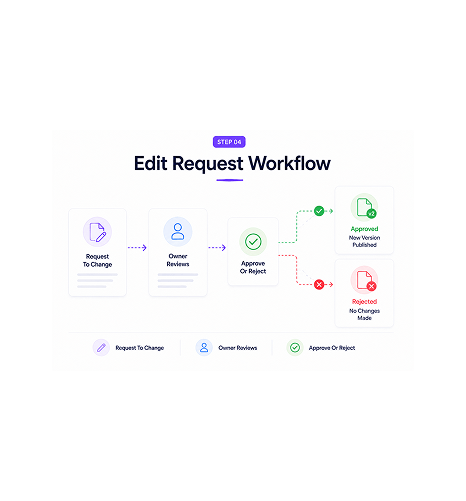
Edit Request Workflow
Edit requests reviewed and approved
Changes flow through an edit request workflow rather than direct editing. Someone wanting to modify a template submits a request. The owner reviews, approves or rejects, and approved changes become the new version.
- Request To Change
- Owner Reviews
- Approve Or Reject
- Version Controlled
Six reasons templates stop being a free for all
Reusable templates with categories and custom fields. Use counts show what works. Edit requests control every change.

Reusable templates save time on every contract
Starting each contract from a blank document is friction the team faces hundreds of times a year. Reusable templates produce new instances in seconds.

Categories keep the library organised at scale
A flat list becomes hard to navigate past 30 entries. Categories organise templates by type so the team finds what it needs: service agreements, NDAs, employment, vendor.

Custom fields match the team's specific needs
Generic templates miss data points unique to your operation. Custom fields per template capture exactly what each type needs: value, jurisdiction.

Use count shows which templates earn their place
Templates nobody uses are clutter. Templates used hundreds of times a quarter are the core of the operation. Use count tracking surfaces which earn their place.

Edit request workflow prevents uncontrolled changes
Free-for-all editing breeds chaos: a clause shifts without review, the master drifts. Edit requests route changes through owner approval.

Global sharing means everyone uses the latest
Templates in personal drives mean different teams use different versions. Global templates shared across the organisation mean every team uses the same approved version.
Reusable templates save time on every contract
Starting each contract from a blank document is friction the team faces hundreds of times a year. Reusable templates produce new instances in seconds.
Categories keep the library organised at scale
A flat list becomes hard to navigate past 30 entries. Categories organise templates by type so the team finds what it needs: service agreements, NDAs, employment, vendor.
Custom fields match the team's specific needs
Generic templates miss data points unique to your operation. Custom fields per template capture exactly what each type needs: value, jurisdiction.
Use count shows which templates earn their place
Templates nobody uses are clutter. Templates used hundreds of times a quarter are the core of the operation. Use count tracking surfaces which earn their place.
Edit request workflow prevents uncontrolled changes
Free-for-all editing breeds chaos: a clause shifts without review, the master drifts. Edit requests route changes through owner approval.
Global sharing means everyone uses the latest
Templates in personal drives mean different teams use different versions. Global templates shared across the organisation mean every team uses the same approved version.




9700+
Teams running governed templates that scale with the organisation
Built for teams whose contract templates need real governance, not free for all editing
Legal operations teams maintaining the master contract library who need version control over every change. Compliance teams enforcing approved versions. Contract managers needing use-count visibility.
Templates All Types
Available
Tracked
Workflow
Categories, custom fields, global sharing
Reusable templates organised by category. Custom fields per template capture data points specific to each type. Global sharing means the whole organisation works from the same approved versions, not scattered copies.
Everything the template layer ships with
Reusable templates, categories, custom fields, use count tracking, edit request workflow, global sharing.

Reusable Document Templates
Any document the team uses repeatedly becomes a template. NDAs, service agreements, offers. New instances generate in seconds.

Template Categories
Categories organise templates by type. Service agreements, vendor contracts, and HR documents stay separate and easy to find.

Custom Fields Per Template
Each template carries custom fields for its type: deal value, jurisdiction, term. Fields populate automatically on new instances.

Use Count Tracking
Every template tracks how many times it's been used. The team sees which run hundreds of times a quarter and which sit unused. Cleanup becomes data driven.

Edit Request Workflow
Changes flow through an approval workflow rather than direct editing. Submitters propose, owners review, approved changes become the new version.

Global Template Sharing
Templates published globally reach everyone. The whole organisation works from the same approved versions, not scattered copies.
Everything you need to know
Questions about templates, categories, custom fields, edit requests, and use counts.
Sigi drafts, sends, and gets it signed without the chasing.
Turn a contract into a signed, audited document in minutes while AI flags risky clauses before they reach your signer.
- 5 min
- average time to signed
- 0
- risky clauses missed
- 100%
- documents with audit trail
- 6
- signing workflows supported