





Reshape every value
between every step
A visual editor for field mapping, filtering, aggregation, strings, dates, and math, plus JavaScript when you need it.

From raw values to clean data in 4 steps
Pick the data to reshape, choose the transformation, configure visually, and pass the clean output to the next step.

Pick the Source
Pick the data source
Every value from every earlier step is an input: single fields, full records, arrays, nested objects, anything previous nodes produced. Browse the variables panel, click the value, and it lands in the transform node ready to use.
- Variables Panel
- Any Earlier Step
- Fields & Records
- Nested Objects
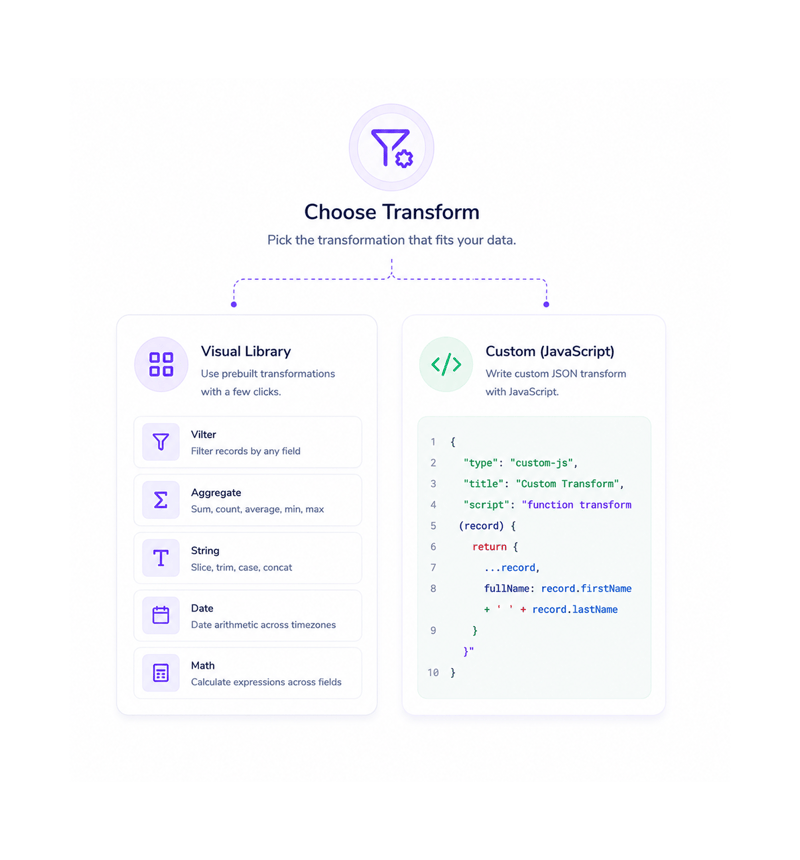
Choose Transform
Choose the transformation
Pick from the visual library: filter records, aggregate with sum/count/average/min/max, reshape strings, do date math across timezones, calculate across fields. For an edge case it misses, drop into the JavaScript editor.
- Filter
- Aggregate
- Format
- Calculate
- JavaScript
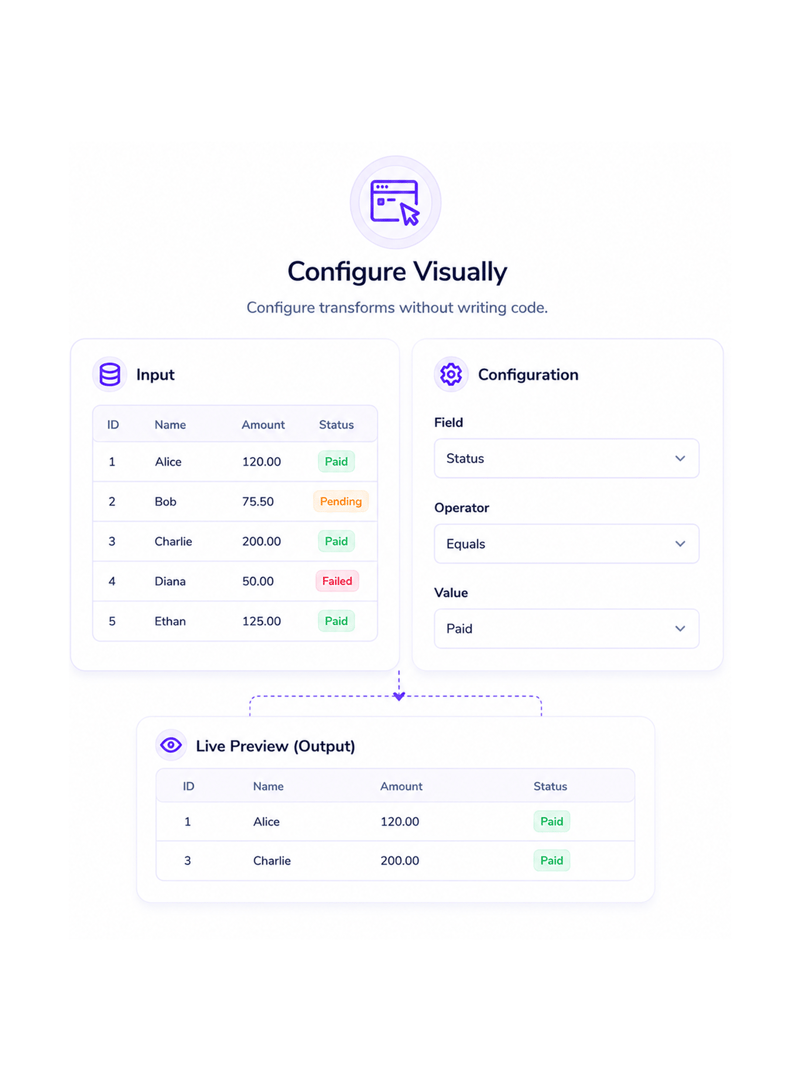
Configure Visually
Configure without writing code
The visual editor opens with the input on the left and the configuration on the right. Pick the field, the operator, and the value. Every choice updates a live preview of the output, so you see what the transform produces before saving.
- Input Preview
- Live Output Preview
- No Expressions
- Pick & Configure
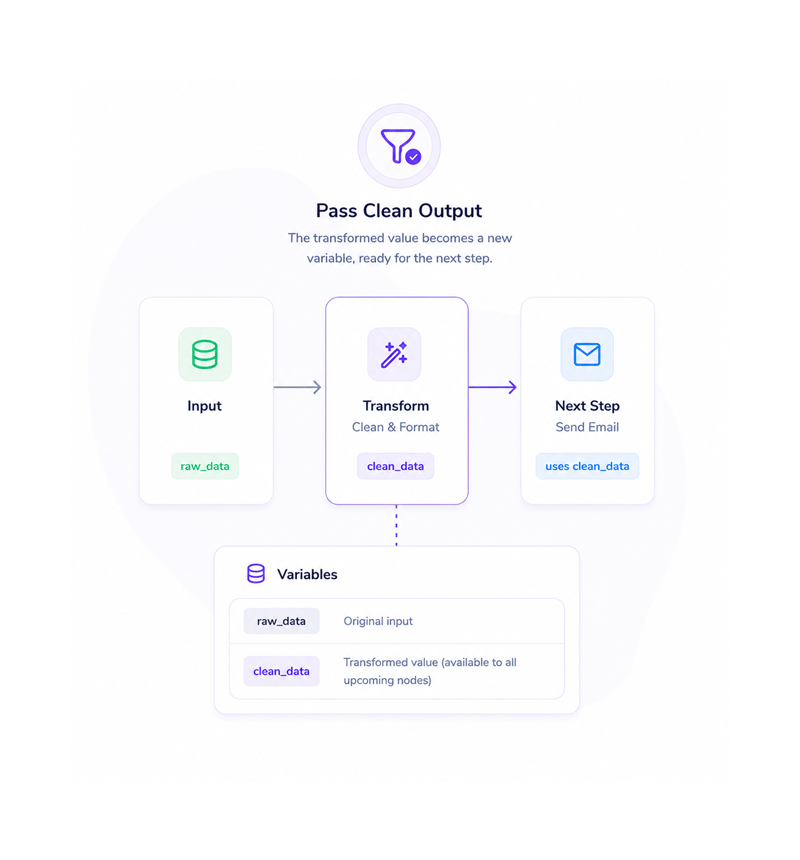
Pass Clean Output
Pass the clean output forward
The transformed value lands as a new variable, available to every node after. The next step picks it up like any other: drop it in from the variables panel. The glue code that needed a custom function becomes a visual node.
- New Variable
- Available Downstream
- No Glue Code
- Same as Any Step
Six reasons teams never go back
Once everyday reshaping is visual and JavaScript is just the escape hatch, writing glue code in every workflow looks like needless labour.

No more glue code between steps
The integration step that used to need a developer to write a transformation function disappears. Filtering, picking fields, renaming keys: all visual now.

Aggregations finally make sense
Sum, count, average, min, max over records used to mean a meeting with a developer, then waiting and testing. The lead who wants total deal value is done in seconds.

Date math without timezone headaches
Adding days, calculating differences, formatting dates a partner expects, converting timezones: all visual, with timezones handled correctly by default.

Strings reshaped with one click
Concatenating a name, extracting an email domain, replacing tokens, trimming, splitting: every string operation is a click away. No more rewriting the same lines.

JavaScript only when you actually need it
The visual editor covers about 90% of transformations. For edge cases the JavaScript editor opens with full language access: power for developers, visual flow for the rest.

Errors caught before they reach production
Every transformation runs through live validation as you configure it. Missing fields, mismatched types, and bad references are flagged inline in plain English.
No more glue code between steps
The integration step that used to need a developer to write a transformation function disappears. Filtering, picking fields, renaming keys: all visual now.
Aggregations finally make sense
Sum, count, average, min, max over records used to mean a meeting with a developer, then waiting and testing. The lead who wants total deal value is done in seconds.
Date math without timezone headaches
Adding days, calculating differences, formatting dates a partner expects, converting timezones: all visual, with timezones handled correctly by default.
Strings reshaped with one click
Concatenating a name, extracting an email domain, replacing tokens, trimming, splitting: every string operation is a click away. No more rewriting the same lines.
JavaScript only when you actually need it
The visual editor covers about 90% of transformations. For edge cases the JavaScript editor opens with full language access: power for developers, visual flow for the rest.
Errors caught before they reach production
Every transformation runs through live validation as you configure it. Missing fields, mismatched types, and bad references are flagged inline in plain English.




9700+
Teams transforming data without
writing code
Built for teams that want power without writing code
Operations, marketing ops, customer success, automation engineers, and founders use Revo's transformation layer as the data shaping toolkit their workflows run on. The visual editor is the default; JavaScript is the escape hatch.
Editor
Code Default
Optional
Preview
Every common operation, no code
Filtering, aggregation, strings, dates, math, field mapping. The visual editor handles every common transformation with a configure and preview flow that shows output before save.
Every transformation, every step
A data transformation toolkit built into the platform. Field mapping, filtering, aggregation, strings, dates, JavaScript.

Field Mapping Between Steps
Move values from one step's output to another's input with a click. Rename keys, restructure objects, flatten or nest all visually.

Visual Filtering on Any Field
Filter a list by any field with any condition: equality, ranges, contains, regex, is empty. Combine with and/or. The matching subset flows on.

Aggregation Functions
Sum, count, average, min, and max across any list. Total deal values for the week, count leads, average time on a stage. Group by any field.

String Operations
Concatenate, split, replace, trim, change case, extract substrings, match patterns, format with templates. Every string operation is one click.

Date Arithmetic and Formatting
Add or subtract any unit. Calculate the difference between timestamps. Convert timezones correctly. Format dates for the next system.

JavaScript JSON Transforms
When the visual editor misses an edge case, the JavaScript editor opens with full language access, syntax highlighting, and live preview.
Everything you need to know
Questions about visual vs JavaScript, aggregations, timezones, strings, and errors.
Describe the workflow, Revo builds it across 1,000+ apps.
Write an automation in plain English and Revo connects your tools, then sends AI agents to take action while you sleep.
- 1,000+
- app integrations
- 99.9%
- workflow uptime
- 0
- lines of code to build
- 10x
- faster than manual