





Every workflow organised
every version recoverable
Create, edit, and organise workflows into categories. Version control with one click rollback and JSON import/export.
From a scattered list to a managed library in 4 steps
Sort workflows into categories, edit safely in draft mode, track changes, and move across environments.
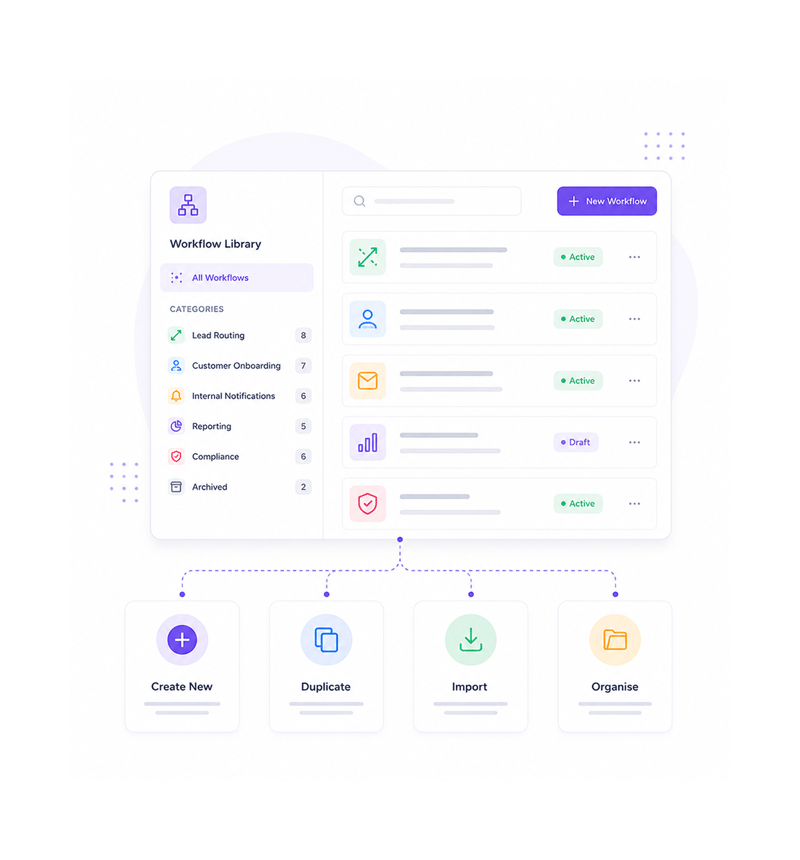
Create & Organise
Create and organise
Build a workflow from scratch, duplicate an existing one, or import one you used elsewhere. Sort the library into custom categories Lead Routing, Onboarding, Reporting. A flat list of forty workflows becomes a structured catalogue.
- Create from Scratch
- Duplicate
- Import
- Custom Categories
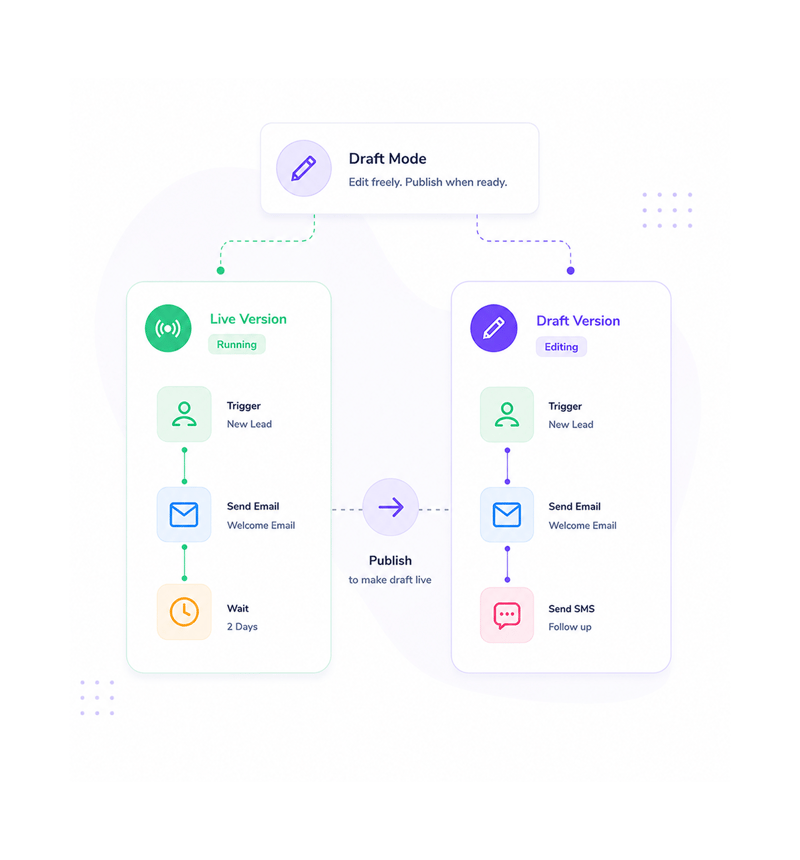
Draft Mode
Edit in draft mode
Every workflow has a live version that keeps running and a draft you can edit freely. Make changes freely none of it affects production until you publish. Live validation runs as you edit, so problems get caught.
- Live Stays Live
- Safe Draft Edits
- Real Time Validation
- Publish When Ready
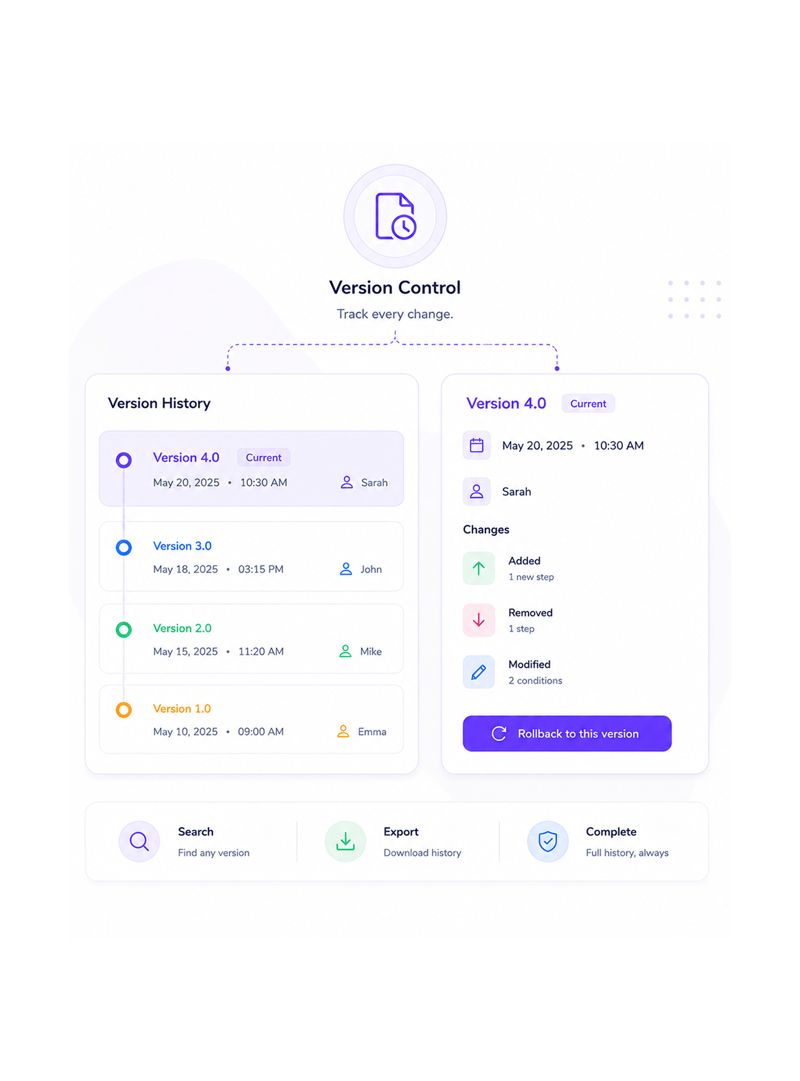
Version Control
Version control tracks everything
Every published change creates a version with a timestamp, the user who made it, and a diff from the last one. A change that turned out wrong is one click from rollback. The history is searchable and complete, so experimentation stops carrying risk.
- Full Version History
- One Click Rollback
- Change Diffs
- Audit Trail
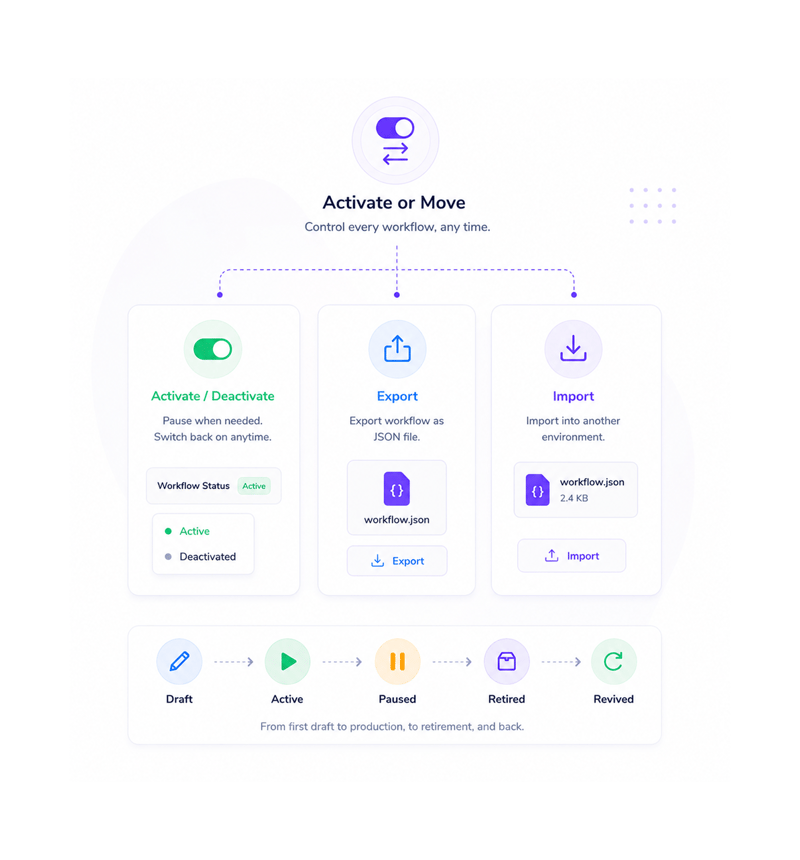
Activate or Move
Activate, deactivate, or move
Pause a workflow and it stays in the library, just deactivated no deletion, no lost history, ready to switch back on. Ship one to another environment with a clean JSON export and import. The library handles every workflow from first draft to revival.
- Activate Toggle
- Deactivate Safely
- JSON Export
- Import to Any Workspace
Six reasons teams never go back
Once a team treats workflows as a library with categories, versions, rollback, a flat list feels like editing production.

Workflows organised, not scattered
A workspace running forty workflows stops being a flat list and becomes a structured library. New teammates find what they need.

Edit safely without breaking production
Draft mode means every edit happens on a version while the workflow keeps running. Try a branch, swap an action. Fear stops leaving them broken.

One click rollback saves the day
Every published change creates a version. A change that turned out wrong rolls back with one click. The midnight incident becomes a quick fix.

Duplicate and remix what works
A workflow you perfected over two weeks becomes the starting point for the next three. Duplicate, change what differs, ship fast.

Move workflows between environments
Built in staging, need it in production? Export as JSON, import into the production workspace. Share a pattern with another team? Send the JSON.

Pause without losing anything
Pause a workflow and it stays in the library, deactivated. The trigger stops firing but every node, version, and test result stays. Switch back on.
Workflows organised, not scattered
A workspace running forty workflows stops being a flat list and becomes a structured library. New teammates find what they need.
Edit safely without breaking production
Draft mode means every edit happens on a version while the workflow keeps running. Try a branch, swap an action. Fear stops leaving them broken.
One click rollback saves the day
Every published change creates a version. A change that turned out wrong rolls back with one click. The midnight incident becomes a quick fix.
Duplicate and remix what works
A workflow you perfected over two weeks becomes the starting point for the next three. Duplicate, change what differs, ship fast.
Move workflows between environments
Built in staging, need it in production? Export as JSON, import into the production workspace. Share a pattern with another team? Send the JSON.
Pause without losing anything
Pause a workflow and it stays in the library, deactivated. The trigger stops firing but every node, version, and test result stays. Switch back on.




8400+
Teams managing workflow libraries,
not lists
Built for teams that run dozens of workflows, not three
Ops, automation specialists, customer success, and founders use Revo to keep workflow libraries organised, versioned, and recoverable as they grow. Categories are the structure, drafts the safety net, history the audit trail.
Control
Export
Mode
Categories
Custom categories, clean structure
Sort the library into the categories your team uses Lead Routing, Onboarding, Reporting. Duplicate working patterns to bootstrap new automations. Forty workflows in a flat list become a structured catalogue.
Everything the management layer ships with
A toolkit built into the platform you use. Categories, versions with rollback, JSON portability, drafts.

Custom Categories and Organisation
Sort the library into the categories your team uses Lead Routing, Onboarding, Reporting. Workflows can sit in one category or several.

Version Control with Rollback
Every published change creates a version with timestamp, user, and a clean diff. One click rolls back to any version. Risk gone.

Import and Export as JSON
Every workflow exports to a clean JSON file you can save, share, or import elsewhere. Move staging to production or keep an offline backup.

Draft Mode for Safe Edits
Every workflow has a live version running production and a draft you can edit freely. Live keeps running until you publish the draft.

Activate and Deactivate Toggle
Pause a workflow for days or months without deleting anything. Deactivated workflows keep every node, version, and test result.

Real Time Structure Validation
The platform watches every workflow's structure. Disconnected nodes, broken branches, infinite loops flagged in plain English.
Everything you need to know
Common questions about categories, version history, JSON portability, drafts, and validation.
Describe the workflow, Revo builds it across 1,000+ apps.
Write an automation in plain English and Revo connects your tools, then sends AI agents to take action while you sleep.
- 1,000+
- app integrations
- 99.9%
- workflow uptime
- 0
- lines of code to build
- 10x
- faster than manual