





Build your own integration
ship it to every Revo customer
Register your app, define triggers and actions with JSON schema, configure auth and rate limits, publish to the Revo marketplace.
From idea to shipped integration in 4 steps
Register your app, declare triggers and actions with JSON schema, configure auth, and publish.

Developer Console
Register your app in the Developer Console
Open the Developer Console and create an application entry. Set the name, icon, category, support contact, and description. The console generates credentials, a public ID and a secret key. Rotate the secret any time.
- Developer Console
- Client Credentials
- Rotatable Secret
- Marketplace Profile
JSON Schema Definitions
Define custom triggers and actions
Triggers and actions are defined declaratively with JSON schema. Specify inputs, outputs, required and optional fields, types, and descriptions that appear inline in the editor. The platform validates every workflow.
- JSON Schema
- Declarative
- Inputs & Outputs
- Auto Validation
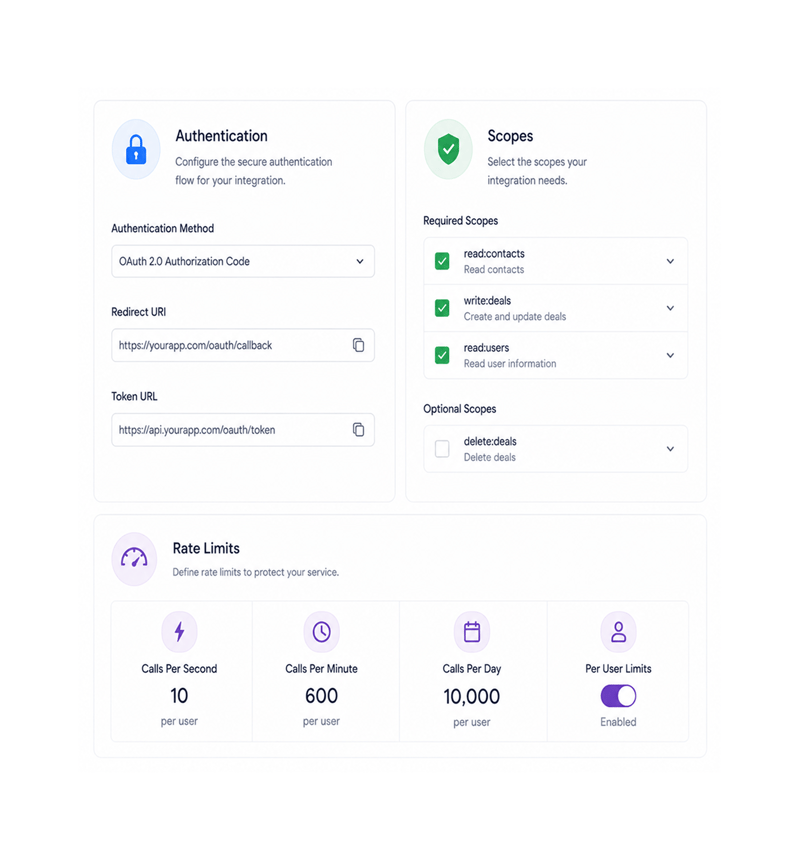
Authentication & Rate Limits
Configure secure authentication and rate limits
Set up the secure auth flow end users complete on install: pick the method, set scopes, set the redirect. Define rate limits to protect your service: per second, minute, day, plus per-user. The platform enforces both.
- Secure Auth Flow
- Configurable Scopes
- Rate Limits
- Per User Limits

Marketplace Publishing
Publish to the app marketplace
Submit to the marketplace when ready. The platform reviews for documentation, schema correctness, and quality, then publishes to every Revo customer. End users find your integration alongside well known providers and install in one click.
- Marketplace Publish
- Quality Review
- One Click Install
- Full SDK & Webhook Guide
Six reasons developers ship on Revo
Once a team can register an app, declare triggers and actions, secure auth, and publish to a marketplace, your own looks easy.

Ship integrations to every ReVO customer
The "we built an integration but nobody can find it" problem disappears the moment your app is in the Revo marketplace. Every customer can search and install in one click.

Declarative trigger and action definitions
JSON schema describes the shape of your triggers and actions instead of custom validation. Inputs, outputs, required fields, types, declared once, enforced everywhere.

Secure authentication handled for you
The auth flow is configured in the Developer Console, not coded. Pick the method, set scopes, configure the redirect. The platform handles tokens, refresh, and revocation.

Rate limits protect your service
A customer calling your service in a tight loop shouldn't be your problem. Set rate limits per second, minute, or day — optionally per user — and the platform enforces them.

Software development kit covers every language
The SDK ships in TypeScript, Python, Go, Ruby, PHP, and Java, each wrapping the same capabilities in native idioms your team already expects.

Documentation that stays accurate
The schema definitions, rate limits, auth configuration, and metadata are the source of truth, and the docs in the workflow editor read directly from them. No stale pages.
Ship integrations to every ReVO customer
The "we built an integration but nobody can find it" problem disappears the moment your app is in the Revo marketplace. Every customer can search and install in one click.
Declarative trigger and action definitions
JSON schema describes the shape of your triggers and actions instead of custom validation. Inputs, outputs, required fields, types, declared once, enforced everywhere.
Secure authentication handled for you
The auth flow is configured in the Developer Console, not coded. Pick the method, set scopes, configure the redirect. The platform handles tokens, refresh, and revocation.
Rate limits protect your service
A customer calling your service in a tight loop shouldn't be your problem. Set rate limits per second, minute, or day — optionally per user — and the platform enforces them.
Software development kit covers every language
The SDK ships in TypeScript, Python, Go, Ruby, PHP, and Java, each wrapping the same capabilities in native idioms your team already expects.
Documentation that stays accurate
The schema definitions, rate limits, auth configuration, and metadata are the source of truth, and the docs in the workflow editor read directly from them. No stale pages.




4200+
Developers shipping integrations on the
Revo platform
Built for developers who build on top of Revo
Software companies, internal developer teams, agency engineers, and platform teams use the Revo Developer Platform as the surface they build against. The console is the workspace, JSON schema the contract.
Console
Schema
SDK
Distribution
Console, schema, credentials, limits
The Developer Console is the workspace where your integration lives. Generate credentials, declare triggers and actions with JSON schema, configure auth, and set rate limits, all in one place.
Everything the developer platform ships with
A complete integration toolkit: Developer Console, JSON schema, secure auth, rate limits, marketplace.

Developer Console with Client Credentials
A dedicated workspace for every app with name, icon, category, description, support contact, and credentials. Rotate the secret any time.

Custom Triggers via JSON Schema
Define triggers with declarative JSON schema: output shape, required and optional fields, types, and inline descriptions. The schema is the contract.

Custom Actions via JSON Schema
Define actions with the same JSON schema: inputs, required and optional fields, types, defaults, validation. End users see standard field mapping.

Secure Authentication Configuration
Configure the secure auth flow for your end users. Pick the method, set scopes, configure the redirect. The platform handles renewals and revocation.

Configurable Rate Limits
Set rate limits that protect your service from runaway workflows. Configure calls per second, minute, day, and optional per-user limits.

App Marketplace Publishing
Submit your app to the Revo marketplace and reach every customer the moment review completes. Track installs, active users, and feedback from the console.
Everything you need to know
Common questions about the Developer Console, JSON schema, auth, rate limits, SDK, and the marketplace.
Describe the workflow, Revo builds it across 1,000+ apps.
Write an automation in plain English and Revo connects your tools, then sends AI agents to take action while you sleep.
- 1,000+
- app integrations
- 99.9%
- workflow uptime
- 0
- lines of code to build
- 10x
- faster than manual